
There are three 4 main product types that are supported by the OneClick Variations Grabber plugin i.e. Simple, Variable, Grouped, and Subscription.
While the first three are supported built-in by WooCommerce, the Subscription product compatibility is with the WooCommerce Subscriptions plugin.
Simple Products Tab
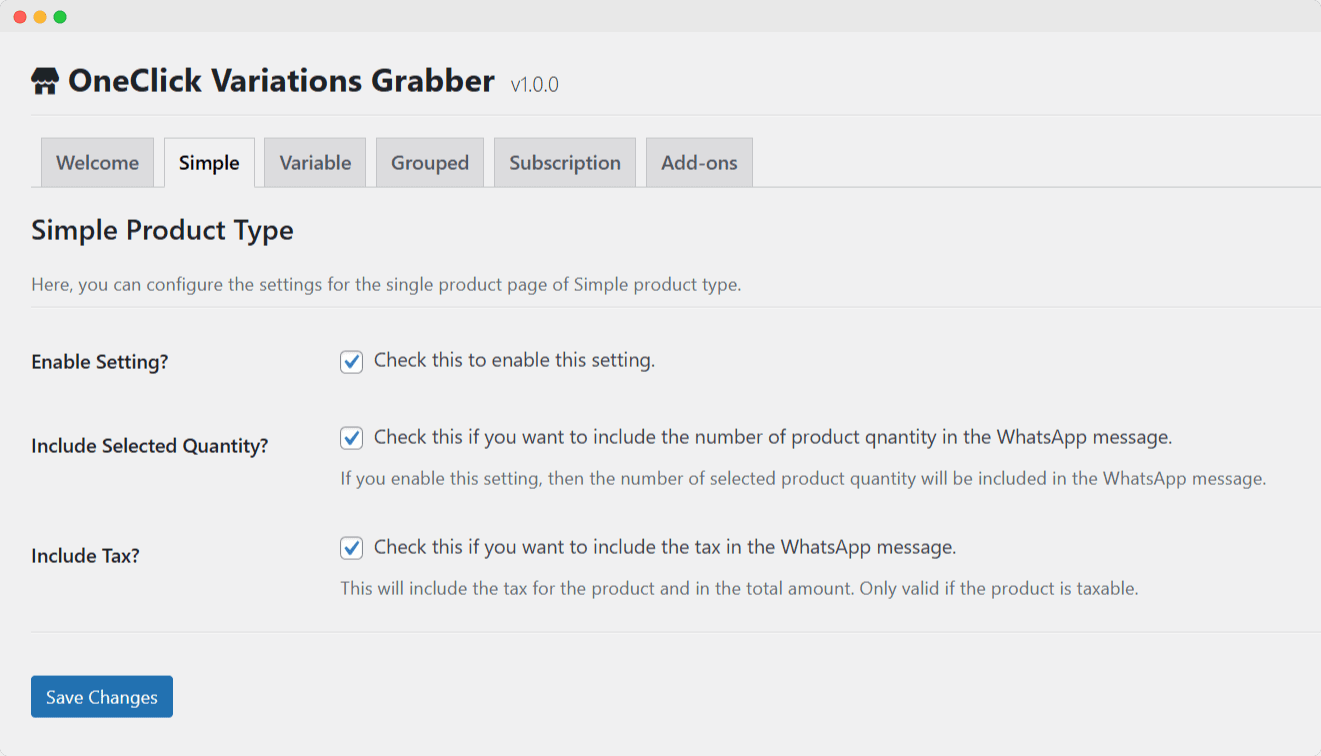
Purpose: Configure WhatsApp integration for simple WooCommerce products.
Available Settings:
- Enable Simple Product Integration
- Option: Checkbox to enable/disable
- Default: Enabled
- Description: Activates WhatsApp button for simple products
- Include Selected Quantity
- Option: Checkbox to include/exclude
- Default: Enabled
- Description: Adds customer-selected quantity to WhatsApp message
- Include Tax Information
- Option: Checkbox to include/exclude
- Default: Enabled
- Description: Automatically calculates and includes tax details in message
WhatsApp Message Format:
Product: [Product Name]
Quantity: [Selected Quantity] (if enabled)
Price: [Product Price]
Tax: [Tax Amount] (if enabled and applicable)
Total: [Total Amount]
Link: [Product URL]
Variable Products Tab
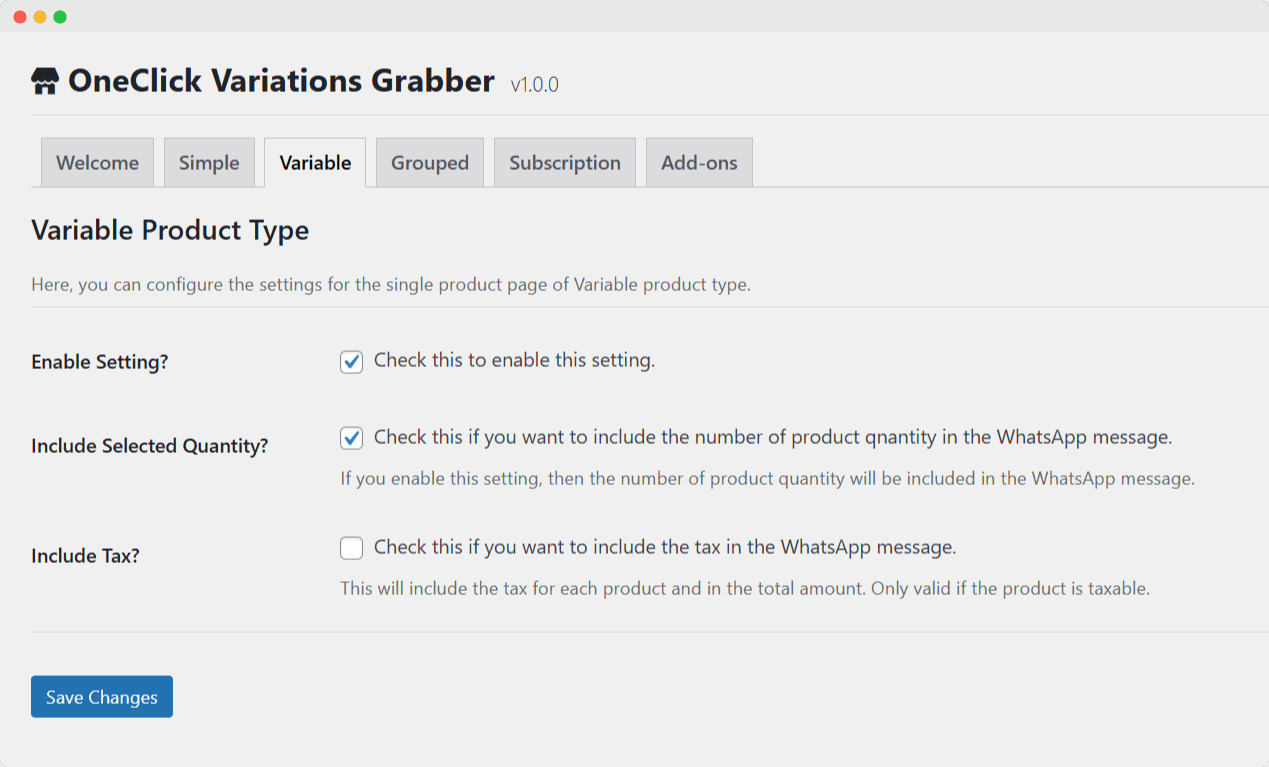
Purpose: Configure WhatsApp integration for variable WooCommerce products with multiple variations.
Available Settings:
- Enable Variable Product Integration
- Option: Checkbox to enable/disable
- Default: Enabled
- Description: Activates WhatsApp button for variable products
- Include Selected Quantity
- Option: Checkbox to include/exclude
- Default: Enabled
- Description: Adds customer-selected quantity to WhatsApp message
- Include Tax Information
- Option: Checkbox to include/exclude
- Default: Enabled
- Description: Automatically calculates and includes tax details for selected variation
WhatsApp Message Format:
Product: [Product Name]
Variation: [Selected Attributes] (e.g., Color: Red, Size: Large)
Quantity: [Selected Quantity] (if enabled)
Price: [Variation Price]
Tax: [Tax Amount] (if enabled and applicable)
Total: [Total Amount]
Link: [Product URL]
Key Features:
- Dynamic Pricing: Automatically updates price based on selected variation
- Attribute Display: Shows all selected variation attributes
- Real-time Updates: Price and tax calculations update as customer changes selections
Grouped Products Tab
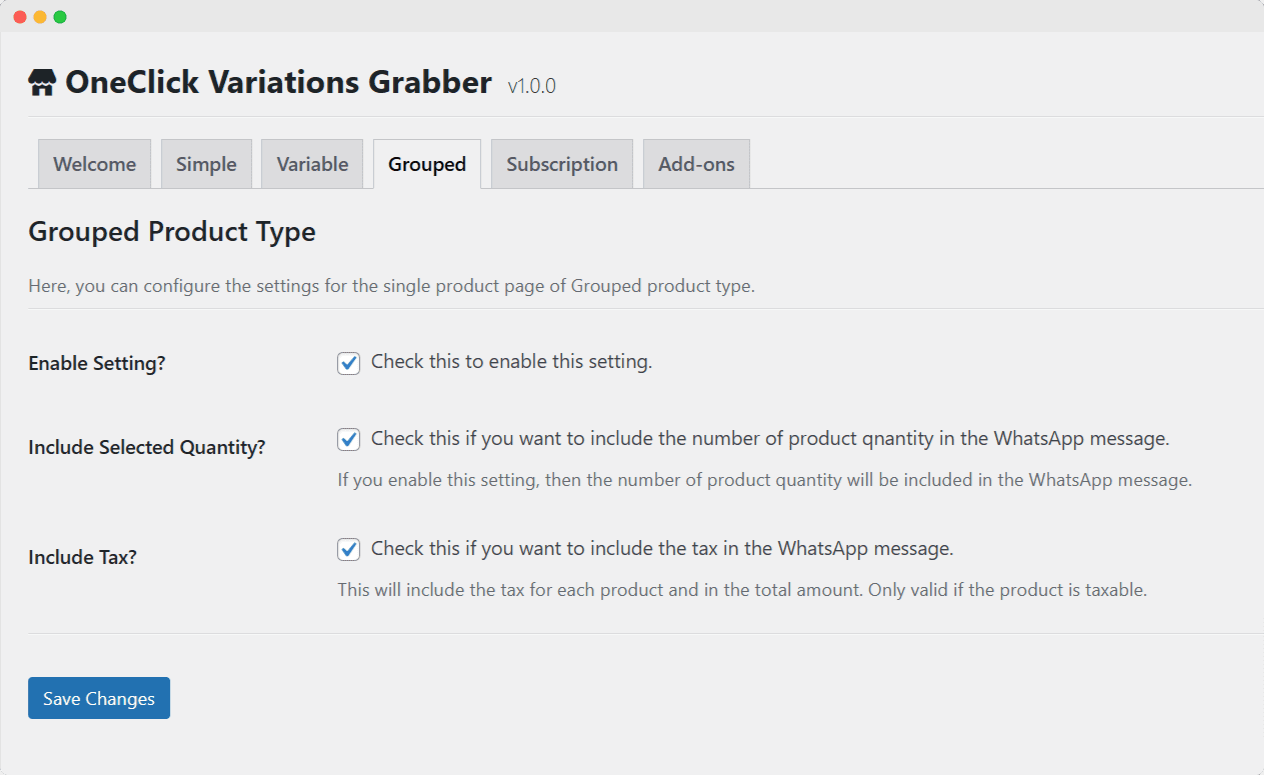
Purpose: Configure WhatsApp integration for grouped WooCommerce products.
Available Settings:
- Enable Grouped Product Integration
- Option: Checkbox to enable/disable
- Default: Enabled
- Description: Activates WhatsApp button for grouped products
- Include Selected Quantity
- Option: Checkbox to include/exclude
- Default: Enabled
- Description: Adds quantities for each grouped product to WhatsApp message
- Include Tax Information
- Option: Checkbox to include/exclude
- Default: Enabled
- Description: Calculates and includes tax for all selected grouped products
WhatsApp Message Format:
Grouped Product: [Main Product Name]

Selected Items:
- [Sub-product 1]: Quantity [X] - Price [Amount]
- [Sub-product 2]: Quantity [Y] - Price [Amount]

Subtotal: [Subtotal Amount]
Tax: [Total Tax] (if enabled and applicable)
Total: [Grand Total]
Link: [Product URL]
Subscription Products Tab
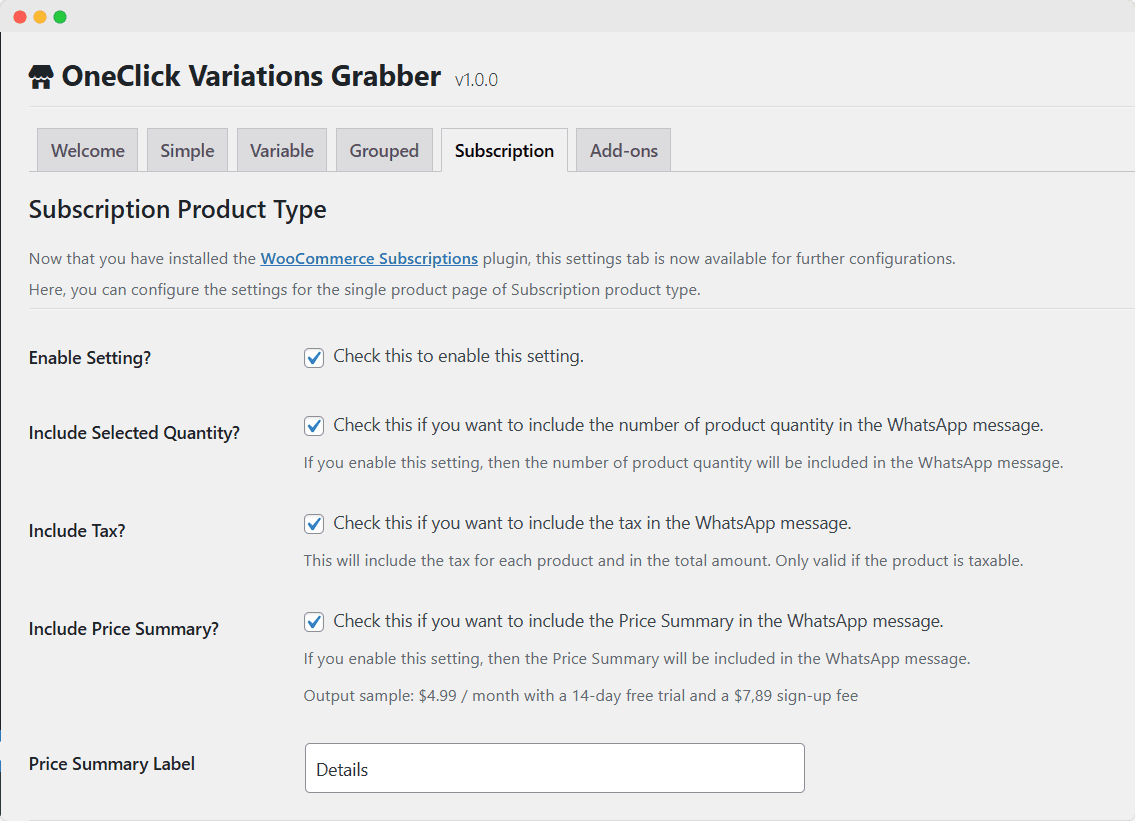
Purpose: Configure WhatsApp integration for WooCommerce Subscription products.
Requirements: WooCommerce Subscriptions plugin must be installed and active.
Basic Settings:
- Enable Subscription Product Integration
- Option: Checkbox to enable/disable
- Default: Enabled
- Description: Activates WhatsApp button for subscription products
- Include Selected Quantity
- Option: Checkbox to include/exclude
- Default: Enabled
- Description: Adds selected quantity to WhatsApp message
- Include Tax Information
- Option: Checkbox to include/exclude
- Default: Enabled
- Description: Calculates and includes tax for subscription
- Include Price Summary
- Option: Checkbox to include/exclude
- Default: Disabled
- Description: Adds detailed price breakdown to message
- Price Summary Label
- Option: Text field
- Default: “Summary”
- Description: Custom label for price summary section
Subscription Details Settings:
- Include Subscription Details
- Option: Checkbox to enable/disable
- Default: Disabled
- Description: Master toggle for all subscription-specific information
- Subscription Details Label
- Option: Text field
- Default: “Subscription Details”
- Description: Header label for subscription details section
- Include Sign-up Fee
- Option: Checkbox to include/exclude
- Default: Disabled
- Description: Adds one-time sign-up fee to message
- Sign-up Fee Label
- Option: Text field
- Default: “Sign-up Fee”
- Description: Custom label for sign-up fee
- Include Subscription Price
- Option: Checkbox to include/exclude
- Default: Disabled
- Description: Adds recurring subscription price
- Subscription Price Label
- Option: Text field
- Default: “Subscription Price”
- Description: Custom label for subscription price
- Include Billing Period
- Option: Checkbox to include/exclude
- Default: Disabled
- Description: Adds billing period (day, week, month, year)
- Billing Period Label
- Option: Text field
- Default: “Subscription Period”
- Description: Custom label for billing period
- Include Billing Interval
- Option: Checkbox to include/exclude
- Default: Disabled
- Description: Adds billing interval (every, every 2nd, etc.)
- Billing Interval Label
- Option: Text field
- Default: “Billing Interval”
- Description: Custom label for billing interval
- Include Free Trial
- Option: Checkbox to include/exclude
- Default: Disabled
- Description: Adds free trial period information
- Free Trial Label
- Option: Text field
- Default: “Free Trial”
- Description: Custom label for free trial period
WhatsApp Message Format (with all options enabled):
Subscription Product: [Product Name]
Quantity: [Selected Quantity]

Subscription Details:
Sign-up Fee: [Amount]
Subscription Price: [Recurring Amount]
Billing Period: [Period]
Billing Interval: [Interval]
Free Trial: [Trial Period]

Summary:
Subtotal: [Subtotal]
Tax: [Tax Amount]
Total: [Total Amount]

Link: [Product URL]